
Successfully integrating a DTF printer into your production line is a transformative step for any textile business. डायरेक्ट-टू-फ़िल्म (डीटीएफ) technology offers a unique combination of high-resolution detail and rugged durability, but the secret to consistent output lies in the initial installation. A proper setup ensures that your hardware—particularly a high-speed dual head DTF printer—operates at peak efficiency while minimizing the risk of nozzle clogs or mechanical wear.
पर शिनफ्लाइंग, we design our industrial printers for streamlined assembly. तथापि, because these machines involve precision electronics and fluid dynamics, following a structured setup protocol is essential for long-term reliability.
कदम 1: Unboxing and Environmental Preparation
Before you power on your DTF printer, you must prepare its environment. Digital textile machinery is sensitive to temperature and humidity. Ideally, your print room should be maintained between 20°C and 28°C (68° F – 82° F) with a humidity level of 50% को 70%.
If the air is too dry, static electricity will build up on the PET film, causing ink “misting.” If it is too humid, the ink will not set correctly. Once the environment is stabilized, carefully unbox the machine and place it on a level, vibration-free surface. Xinflying’s industrial units come with adjustable leveling feet; use a spirit level to ensure the print bed is perfectly horizontal to prevent uneven ink flow.
कदम 2: Hardware Assembly and Grounding
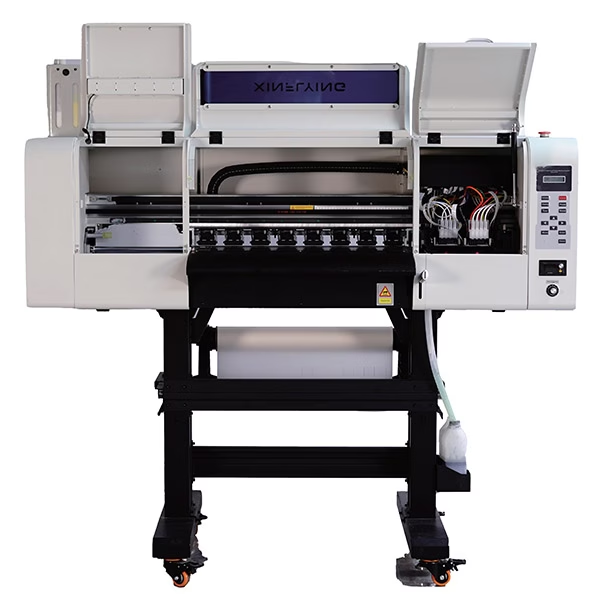
Most professional dual head DTF printer models, such as the Xinflying C602, are shipped with the stand and the main body partially separated for safety.
Mount the Body: Secure the printer body to its heavy-duty stand.
Install the Powder Shaker: Align the automated powder shaker and dryer with the printer’s exit path.
Grounding: This is a critical but often overlooked step. You must connect the printer to a dedicated ground wire. Proper grounding eliminates static electricity, which protects the Hoson mainboards and prevents ink droplets from deviating during high-speed printing.
कदम 3: Ink System Priming and Printhead Installation
If you are setting up a dual head DTF printer, you are likely working with a configuration where one head is dedicated to CMYK and the other to White ink.
Ink Loading: Fill the bulk tanks with high-quality DTF pigment ink. Xinflying systems feature a white ink circulation and stirring motor; ensure this is activated to prevent titanium dioxide sedimentation.
Priming the Dampers: Use a clean syringe to draw ink through the lines into the dampers. This ensures there are no air bubbles in the system, which is the leading cause of “drop-outs” during a print run.
Printhead Seating: Carefully install the Epson i3200-A1 heads into the carriage. Ensure the ribbon cables are inserted straight and locked securely. Any misalignment here can lead to a short circuit on the head board.
कदम 4: Software Configuration and RIP Connection
ए डीटीएफ प्रिंटर cannot function without a “translator.” This is the Raster Image Processor (फाड़ना) सॉफ़्टवेयर. Xinflying machines are optimized for MainTop, फ़ोटो प्रिंट, and CADlink.
Install Drivers: Install the specific Hoson drivers provided by Xinflying on your workstation.
IP Configuration: Most industrial dual head DTF printer units connect via a network cable (LAN) for stable data transmission. Set a static IP address on your computer that matches the printer’s network segment.
ICC Profile Loading: Import the ICC profiles provided by the manufacturer. These profiles are calibrated for specific ink and film combinations to ensure that the “Red” you see on your screen matches the “Red” on the final garment.
कदम 5: Mechanical Calibration (Alignment)
Once the software is communicating with the hardware, you must perform a series of calibration prints. This is the most technical part of the setup.
Vertical Alignment: Ensures the dual head DTF printer heads are perfectly perpendicular to the film.
Horizontal (Bi-directional) Alignment: Adjusts the timing of the ink firing as the carriage moves left to right and right to left.
Step Calibration: Ensures the “feed” motor moves the PET film the exact distance required after each pass. If this is off, you will see “banding” (horizontal lines) in your designs.
कदम 6: The First Test Print and Curing
Load your PET film into the rear feeding system, ensuring it passes smoothly under the vacuum suction platform. Run a “Nozzle Check” to confirm all nozzles are firing perfectly.
Perform your first test print using a standard color chart. As the film exits the DTF printer, it enters the powder shaker. Adjust the shaker’s vibration intensity so that the TPU powder sticks only to the wet ink. अंत में, set the oven temperature (typically between 110°C and 130°C). The powder should melt into a smooth, “orange peel” texture—not a bubbly or scorched mess.
कदम 7: Establishing a Maintenance Routine
The setup is not complete until you have a maintenance schedule. A dual head DTF printer is an industrial tool that requires daily care.
दैनिक: Perform a nozzle check and a quick clean every morning.
साप्ताहिक: Wipe the wiper blade and the edges of the capping station with specialized cleaning solution.
महीने के: Lubricate the THK linear guide rails to ensure the carriage moves smoothly.
निष्कर्ष: Partnering for Success
Setting up a DTF printer is an investment in your company’s creative future. While the process involves several technical layers, the precision engineering of Xinflying machines—from the Hoson mainboards to the Epson i3200-A1 heads—ensures that once the setup is complete, your production will be stable and high-yielding.
By following this guide, you ensure that your डुअल हेड डीटीएफ प्रिंटर is not just installed, but optimized for the rigorous demands of the global textile market. याद करना, a professional setup is the foundation of a professional brand. If you encounter complexities during your installation, Xinflying’s round-the-clock technical support is always available to guide you through the process, ensuring your production floor never skips a beat.
