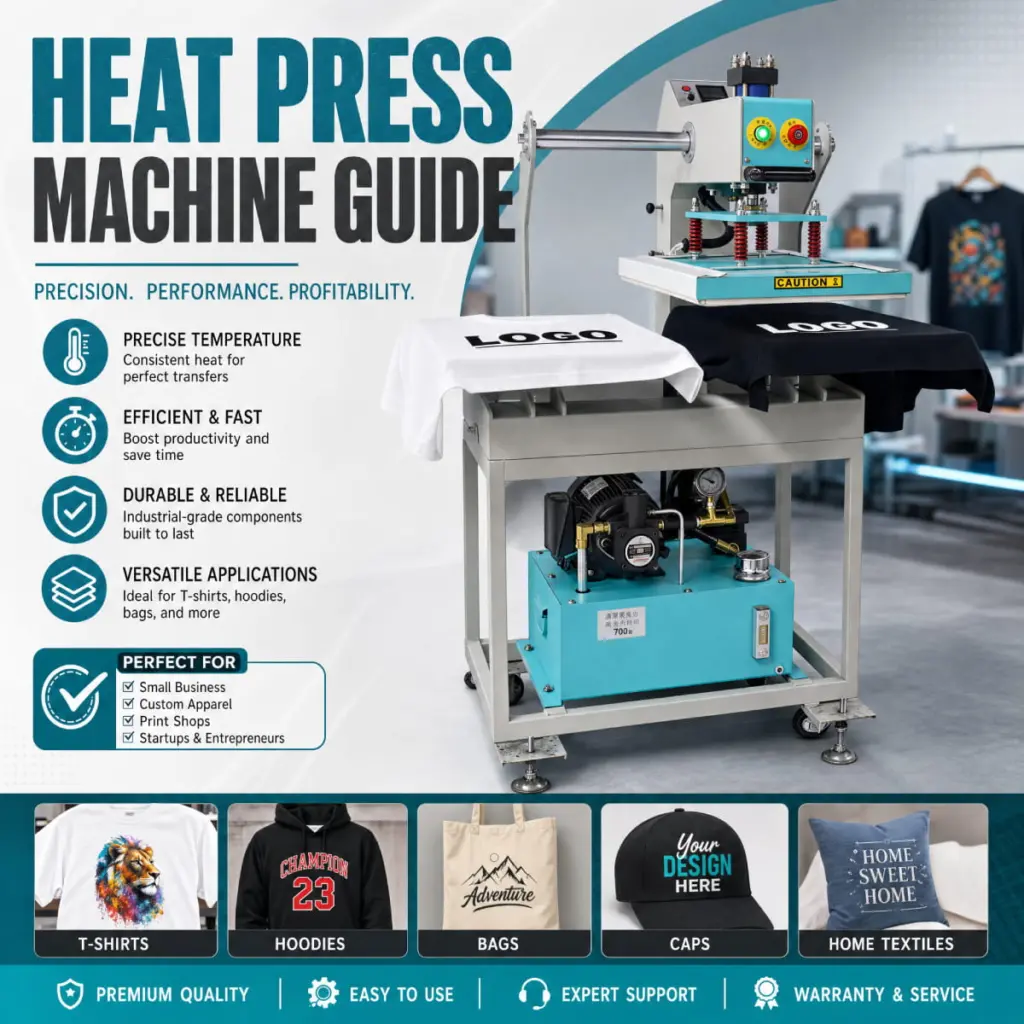
चाहे आप कस्टम टी-शर्ट प्रिंट कर रहे हों, वैयक्तिकृत उपहार बनाना, या प्रिंट-ऑन-डिमांड व्यवसाय चला रहे हैं, हीट प्रेस मशीन आपके सेटअप में सबसे महत्वपूर्ण उपकरणों में से एक है. लेकिन अगर आपने पहले कभी इसका इस्तेमाल नहीं किया है, तापमान का संयोजन, दबाव, और समय भारी लग सकता है.
इस गाइड में वह सब कुछ शामिल है जो आपको जानना आवश्यक है - विभिन्न प्रकार के हीट प्रेस को समझने से लेकर चरण-दर-चरण दबाने के निर्देशों तक, सामग्री के अनुसार सेटिंग्स, और सबसे आम समस्याओं को कैसे ठीक करें. अंत तक, आप स्वच्छ उत्पादन कर सकेंगे, हर बार टिकाऊ स्थानान्तरण.
क्या है एक हीट प्रेस मशीन?
हीट प्रेस मशीन ऊष्मा के संयोजन का उपयोग करती है, दबाव, और किसी डिज़ाइन को सब्सट्रेट पर स्थायी रूप से स्थानांतरित करने का समय - आमतौर पर कपड़ा, लेकिन सिरेमिक मग जैसी कठोर सतहें भी, धातु पैनल, और फोन के मामले.
घरेलू लोहे के विपरीत, एक हीट प्रेस सुसंगतता प्रदान करता है, संपूर्ण पट्ट सतह पर समान ताप. इसमें वर्दी भी लागू होती है, समायोज्य दबाव और एक अंतर्निर्मित टाइमर का उपयोग करता है ताकि आप हर बार समान परिणाम पुन: उत्पन्न कर सकें. ये तीन चर हैं - ऊष्मा, दबाव, और समय - को कहा जाता है “तीन स्तंभ” ताप दबाव का.
हीट प्रेस का उपयोग कई प्रकार के ट्रांसफर मीडिया के साथ किया जाता है:
- हीट ट्रांसफर विनाइल (एचटीवी) - विनाइल कटर से काटें, फिर कपड़े पर दबाया
- उर्ध्वपातन स्थानान्तरण - ट्रांसफर पेपर पर सब्लिमेशन स्याही से मुद्रित, फिर पॉलिएस्टर या पॉलिमर-लेपित सब्सट्रेट पर दबाया जाता है
- डीटीएफ (डायरेक्ट-टू-फ़िल्म) स्थानांतरण - एक विशेष स्याही प्रणाली के साथ पीईटी फिल्म पर मुद्रित, फिर वस्तुतः किसी भी कपड़े पर दबाया जाता है
- स्क्रीन प्रिंट स्थानांतरण - स्क्रीन प्रिंटर से पूर्व-मुद्रित स्थानांतरण, गर्मी से सक्रिय
हीट प्रेस मशीनों के प्रकार
इससे पहले कि आप दबाना शुरू करें, इससे यह समझने में मदद मिलती है कि आप किस प्रकार की मशीन का उपयोग कर रहे हैं. तीन सबसे आम डिज़ाइन हैं:
क्लैमशेल हीट प्रेस
शुरुआती और छोटे व्यवसायों के लिए सबसे लोकप्रिय शैली. ऊपरी प्लेट सीपी की तरह ऊपर की ओर खुलती है. इसका पदचिह्न छोटा है और इसे संचालित करना आसान है, लेकिन खुलने का कोण कपड़ों को सटीक स्थिति में रखना कठिन बना सकता है. टी-शर्ट जैसी फ़्लैट वस्तुओं के लिए सर्वोत्तम, टोटे झोले, और माउस पैड.
स्विंग-अवे हीट प्रेस
ऊपरी प्लेट किनारे की ओर झूलती है, तुम्हें पूरा दे रहा हूँ, निचली प्लेट तक अबाधित पहुंच. इससे पोजीशनिंग आसान हो जाती है और जलने का खतरा कम हो जाता है. स्विंग-अवे प्रेस अधिक भारी होती हैं लेकिन पेशेवरों द्वारा उनकी सटीकता के लिए पसंद की जाती हैं. उर्ध्वपातन कार्य के लिए आदर्श जहां सटीक प्लेसमेंट मायने रखता है.
खींचना (बाहर खिसकना) गर्म प्रेस
निचली प्लेट एक दराज की तरह आपकी ओर खिसकती है, ताकि आप गर्म ऊपरी प्लेट के नीचे पहुंचे बिना कपड़े लोड कर सकें. उत्पादन परिवेश और उच्च मात्रा में मुद्रण के लिए यह सबसे सुरक्षित विकल्प है.
स्थानांतरण प्रकार के अनुसार हीट प्रेस सेटिंग्स
असफल स्थानांतरण का सबसे बड़ा कारण गलत सेटिंग्स है. इस संदर्भ तालिका को शुरुआती बिंदु के रूप में उपयोग करें, फिर अपनी विशिष्ट सामग्रियों और निर्माता दिशानिर्देशों के आधार पर समायोजित करें.
| स्थानांतरण प्रकार | तापमान | समय | दबाव | छीलना |
| उच्च बनाने की क्रिया (कपड़ा) | 385° F / 196डिग्री सेल्सियस | 45-60 सेकंड | मध्यम | गरम छिलका |
| उच्च बनाने की क्रिया (कठोर सब्सट्रेट) | 400° F / 204डिग्री सेल्सियस | 150-180 सेकंड | मध्यम-दृढ़ | गरम छिलका |
| एचटीवी (मानक) | 305° F / 152डिग्री सेल्सियस | 10-15 सेकंड | मध्यम | ठंडा छिलका |
| एचटीवी (कश / स्पेशलिटी) | 270° F / 132डिग्री सेल्सियस | 10 सेकंड | रोशनी | गरम छिलका |
| डीटीएफ स्थानांतरण | 320° F / 160डिग्री सेल्सियस | 15-20 सेकंड | अटल | ठंडा छिलका |
| स्क्रीन प्रिंट स्थानांतरण | 350° F / 177डिग्री सेल्सियस | 8-12 सेकंड | मध्यम | गर्म या ठंडे (निर्देशों के अनुसार) |
महत्वपूर्ण: हमेशा अपने स्थानांतरण या स्याही निर्माता से विशिष्ट निर्देशों की जांच करें. उपरोक्त तालिका केवल सामान्य प्रारंभिक बिंदु प्रदान करती है.
शुरू करने से पहले आपको क्या चाहिए
अपनी पहली प्रेस से पहले निम्नलिखित इकट्ठा करें:
- हीट प्रेस मशीन (सीपी, झूला-दूर, या शैली बनाएं)
- मीडिया स्थानांतरण (एचटीवी, उर्ध्वपातन कागज, डीटीएफ फिल्म, वगैरह।)
- सब्सट्रेट (गारमेंट, लूट के लिए हमला करना, पैनल, थैला, वगैरह।)
- टेफ्लॉन शीट या सिलिकॉन पैड - परिधान की सतह की रक्षा करता है और गर्मी को समान रूप से वितरित करता है
- गर्मी प्रतिरोधी टेप - दबाने के दौरान स्थानान्तरण को बनाए रखता है
- लिंट रोलर - दबाने से पहले सब्सट्रेट से मलबा हटा देता है
- गर्मी प्रतिरोधी दस्ताने - गर्म सामग्री को सुरक्षित रूप से संभालने के लिए
- थर्मामीटर (वैकल्पिक) - यह सत्यापित करने के लिए कि आपका प्लेटन तापमान सटीक है
हीट प्रेस मशीन का उपयोग कैसे करें: क्रमशः
कदम 1: अपना तापमान निर्धारित करें, समय, और दबाव
मशीन चालू करने से पहले, अपने स्थानांतरण प्रकार के लिए सही सेटिंग्स डायल करें (ऊपर दी गई तालिका या अपने स्थानांतरण निर्माता के दिशानिर्देश देखें). मशीन को पूरी तरह पहले से गर्म होने दें - अधिकांश हीट प्रेस लेते हैं 5 को 10 निर्धारित तापमान तक पहुंचने में मिनट. जब तक डिस्प्ले यह पुष्टि न कर दे कि लक्ष्य तापमान पहुंच गया है, तब तक दबाना शुरू न करें.
दबाव बनाने के लिए, एक मुड़े हुए तौलिये पर प्रेस को बंद करें जो आपके सब्सट्रेट की मोटाई से मेल खाता हो. अधिकांश सीपी मशीनों के लिए, दबाव बढ़ाने के लिए दबाव घुंडी को दक्षिणावर्त घुमाएँ और कम करने के लिए वामावर्त घुमाएँ. मध्यम दबाव का मतलब है कि हैंडल बंद करते समय आपको ध्यान देने योग्य प्रतिरोध महसूस होता है.
कदम 2: अपना सब्सट्रेट तैयार करें
- किसी भी धूल को हटाने के लिए लिंट रोलर का उपयोग करें, फाइबर, या सतह से मलबा.
- कपड़े या सब्सट्रेट को निचली प्लेट पर सपाट रखें, किसी भी झुर्रियों को दूर करना.
- नमी और झुर्रियाँ हटाने के लिए 3-5 सेकंड के लिए प्री-प्रेस करें. यह चरण उर्ध्वपातन मुद्रण के लिए विशेष रूप से महत्वपूर्ण है, जहां नमी रंग संबंधी समस्याओं का कारण बनती है.
- अपना स्थानांतरण करने से पहले सब्सट्रेट को कुछ सेकंड के लिए ठंडा होने दें.
कदम 3: अपने स्थानांतरण की स्थिति निर्धारित करें
- स्थानांतरण को सब्सट्रेट पर नीचे की ओर रखें (अधिकांश एचटीवी और डीटीएफ स्थानांतरण के लिए).
- उर्ध्वपातन के लिए, ट्रांसफर पेपर के मुद्रित पक्ष को सब्सट्रेट पर नीचे की ओर रखें.
- डिज़ाइन को केंद्र में रखने के लिए रूलर या संरेखण चिह्न का उपयोग करें.
- दबाने के दौरान हिलने से रोकने के लिए यदि आवश्यक हो तो किनारों को गर्मी प्रतिरोधी टेप से सुरक्षित करें.
- डिज़ाइन और प्लेटन की सुरक्षा के लिए स्थानांतरण के ऊपर एक टेफ्लॉन शीट या चर्मपत्र कागज रखें.
कदम 4: प्रेस
- ऊपरी प्लेट को मजबूती से नीचे करें और हैंडल को लॉक कर दें (सीपी प्रेस के लिए).
- टाइमर प्रारंभ करें. टाइमर पूरा होने तक प्लेटन न उठाएं.
- जब टाइमर बंद हो जाता है, प्लेटन को सुचारू रूप से और एक गति में उठाएं. प्रेस को हिलाने या हिलाने से बचें.
कदम 5: छीलें और निरीक्षण करें
चाहे आप गर्म छीलें या ठंडा, यह आपके स्थानांतरण प्रकार पर निर्भर करता है (सेटिंग तालिका देखें). सामान्य तौर पर:
- गरम छिलका: जब सब्सट्रेट अभी भी गर्म हो तो ट्रांसफर पेपर या फिल्म को तुरंत उठा लें. निचले कोण पर धीरे-धीरे छीलें.
- ठंडा छिलका: छीलने से पहले सब्सट्रेट को कमरे के तापमान तक पूरी तरह से ठंडा होने दें. बहुत जल्दी छीलने से डिज़ाइन ऊपर उठ जाते हैं या खिंच जाते हैं.
छीलने के बाद, पूर्ण आसंजन के लिए स्थानांतरण का निरीक्षण करें. यदि कोई किनारा उठ गया है, शीर्ष पर टेफ्लॉन शीट के साथ अतिरिक्त 5-10 सेकंड के लिए फिर से दबाएं.

सामान्य गलतियाँ और उन्हें कैसे ठीक करें
| संकट | संभावित कारण | हल करना |
| डिज़ाइन फीका पड़ गया है या धुल गया है | तापमान बहुत कम, या समय बहुत कम है | तापमान 5°F बढ़ाएँ या जोड़ें 5 सेकंड और एक परीक्षण टुकड़ा फिर से दबाएँ |
| डिज़ाइन टूट गया है या झुलस गया है | तापमान बहुत अधिक है, या समय बहुत लंबा है | तापमान को 10°F कम करें. झुलसे हुए स्थानान्तरण को दोबारा न दबाएँ |
| दबाने के दौरान डिज़ाइन बदल गया | दबाने से पहले स्थानांतरण सुरक्षित नहीं है | दबाने से पहले सभी किनारों को ठीक करने के लिए गर्मी प्रतिरोधी टेप का उपयोग करें |
| असमान स्थानांतरण - अनियमित क्षेत्र | असमान प्लेटन दबाव, या झुर्रीदार सब्सट्रेट | दबाव अंशांकन की जाँच करें; झुर्रियाँ हटाने के लिए प्री-प्रेस करें; निचली प्लेट पर फोम पैड का उपयोग करें |
| डिज़ाइन फ़ाइल से रंग अलग दिखता है | उर्ध्वपातन मुद्रण में रंग प्रोफ़ाइल बेमेल | अपने प्रिंटर और पेपर संयोजन के लिए ICC रंग प्रोफ़ाइल का उपयोग करें |
| धोने के बाद एचटीवी चिपक नहीं रहा है | दबाने के दौरान अपर्याप्त दबाव या समय | दबाव बढ़ाएँ; समय सेटिंग की पुष्टि करें; ठंडे पानी में अंदर-बाहर धोएं |
| भूत छवि (दोहरा प्रभाव) | ट्रांसफर पेपर को ठंडा होने से पहले ही हटा दिया गया | छीलते समय सब्सट्रेट को मजबूती से दबाएं और स्थिर रखें; एक चिकनी गति में छीलें |
बेहतर परिणाम के लिए प्रो युक्तियाँ
- अपने अंतिम उत्पाद पर दबाव डालने से पहले हमेशा स्क्रैप सामग्री पर एक परीक्षण प्रेस करें. यह आपको बर्बादी का जोखिम उठाए बिना सेटिंग्स सत्यापित करने देता है.
- अपनी मशीन के वास्तविक तापमान को सत्यापित करने के लिए प्लेटन थर्मामीटर का उपयोग करें. कई हीट प्रेस डिस्प्ले की तुलना में 5-15°F अधिक गर्म या ठंडे चलते हैं.
- जब आपकी टेफ्लॉन शीट का रंग फीका पड़ने लगे या उसमें दाग दिखने लगे तो उसे बदल दें. एक गंदी चादर आपके परिधान पर निशान स्थानांतरित कर सकती है.
- उर्ध्वपातन के लिए, नमी हटाने के लिए हमेशा सब्सट्रेट को 3-5 सेकंड के लिए पहले से दबाएं. नमी की थोड़ी मात्रा भी रंग बदलने और धुंधले प्रिंट का कारण बन सकती है.
- समान सेटिंग्स वाले एकाधिक आइटम दबाते समय, प्रत्येक प्रेस चक्र के बीच प्रेस को पूर्ण तापमान पर लौटने दें.
- पूर्व-सक्रियण को रोकने के लिए एचटीवी और सब्लिमेशन ट्रांसफर पेपर को सपाट और सीधी धूप से दूर रखें.
अक्सर पूछे जाने वाले प्रश्नों
क्या मैं किसी कपड़े पर हीट प्रेस का उपयोग कर सकता हूँ??
नहीं. विभिन्न स्थानांतरण प्रकारों के लिए विशिष्ट कपड़ों की आवश्यकता होती है. उर्ध्वपातन के लिए पॉलिएस्टर की आवश्यकता होती है (80%+ सामग्री) या पॉलिमर-लेपित सतहें. कपास पर एचटीवी और डीटीएफ ट्रांसफर का उपयोग किया जा सकता है, पॉलिएस्टर, और मिश्रित कपड़े. हमेशा स्थानांतरण निर्माता की कपड़ा आवश्यकताओं की जांच करें.
हीट प्रेस ट्रांसफर कितने समय तक चलता है?
जब सही ढंग से लागू किया जाए, हीट प्रेस ट्रांसफर बहुत टिकाऊ होते हैं. डीटीएफ और उर्ध्वपातन स्थानांतरण झेल सकते हैं 50+ महत्वपूर्ण फीकापन के बिना धोने के चक्र. विनाइल के प्रकार और देखभाल के निर्देशों के आधार पर एचटीवी 40-50 बार धोने के बाद खराब दिखना शुरू हो सकता है. मुद्रित कपड़ों को हमेशा ठंडे पानी में अंदर-बाहर धोएं और तेज़ आंच पर सुखाने से बचें.
मुझे कितना दबाव इस्तेमाल करना चाहिए?
अधिकांश स्थानांतरणों के लिए मध्यम दबाव की आवश्यकता होती है. एक सामान्य मार्गदर्शक के रूप में: हल्के दबाव का मतलब है कि हैंडल न्यूनतम प्रतिरोध के साथ आसानी से बंद हो जाता है; मध्यम दबाव मजबूती से हाथ मिलाने जैसा महसूस होता है; भारी दबाव को बंद करने के लिए महत्वपूर्ण प्रयास की आवश्यकता होती है. जब संदेह हो, मध्यम स्तर से प्रारंभ करें और परिणामों के आधार पर समायोजन करें.
क्या मुझे हर समय टेफ्लॉन शीट की आवश्यकता है??
सर्वाधिक दबाव वाले अनुप्रयोगों के लिए, हाँ. टेफ्लॉन शीट आपके परिधान और प्लेटन दोनों को सीधे संपर्क से बचाती है, गर्मी को समान रूप से वितरित करता है, और स्याही को ऊपरी प्लेट पर चिपकने से रोकता है. कुछ विशेष ऊर्ध्वपातन पत्रों में एक सुरक्षात्मक कोटिंग शामिल होती है जो टेफ्लॉन शीट की आवश्यकता को कम करती है, लेकिन एक का उपयोग करना अभी भी अनुशंसित है.
दबाना शुरू करने के लिए तैयार?
हीट प्रेस मशीन कस्टम प्रिंटिंग के लिए सबसे बहुमुखी उपकरणों में से एक है - और सही सेटिंग्स और तकनीक के साथ, परिणाम खुद अपनी कहानी कहते हैं. चाहे आप अभी शुरुआत कर रहे हों या उत्पादन बढ़ा रहे हों, शिनफ्लाइंग घरेलू और व्यावसायिक उपयोग दोनों के लिए डिज़ाइन की गई पेशेवर हीट प्रेस मशीनों की एक श्रृंखला प्रदान करता है.
अपनी परियोजनाओं के लिए सही मॉडल ढूंढने के लिए हमारे हीट प्रेस मशीन संग्रह को ब्राउज़ करें, या अपने सेटअप के अनुरूप अनुशंसा के लिए हमारी टीम से संपर्क करें.