In commercial DTF printing, a clean print head is the difference between consistent batch quality and costly rework. When nozzles clog, colors streak, the white underbase thins out, and whole production runs drop below sellable grade — costing your shop film, serbuk, buruh, and delivery time. This guide covers how to spot a clogged print head, the four cleaning methods ranked by effort and risk, and a preventive schedule that keeps pencetak DTF uptime high.
What Is a DTF Print Head?
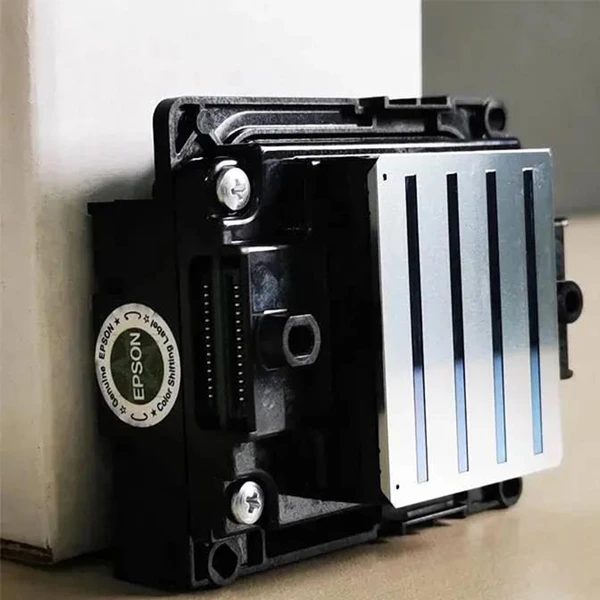
The print head is the component that deposits ink onto the DTF film. It holds hundreds of tiny nozzles that release ink droplets in precise placement to form the design. A clean print head keeps droplet placement accurate — which is what holds fine detail, kecerunan lancar, and an even white underbase layer in production. When even a few nozzles clog, the whole printed image degrades.
Why Print Head Cleaning Matters for Production
A clogged print head does not affect one print — it affects every unit that runs through the line. Blocked nozzles disrupt ink flow, causing uneven ink distribution, warna pudar, coretan, and a weak white underbase. For a commercial shop, that means reprinting batches, wasting DTF film and adhesive powder, and losing machine hours to downtime. Cleaning the kepala cetak on schedule is the most cost-effective way to protect print quality and output capacity.
Tanda-tanda Kepala Cetak Tersumbat
Gejala biasa kepala cetakan tersumbat termasuk:
- Cetakan tidak sekata atau bergaris-garis — lines or streaks that should not be there indicate a blockage disrupting ink flow.
- Faded prints or a thin white underbase — obstructed nozzles leave colors washed out, most visible in high-density areas.
- Missing color channels — a nozzle check print showing gaps means specific nozzles are fully blocked.
- Banding — horizontal bands across the image where ink delivery is inconsistent.
Tools and Cleaning Solutions
Alatan Diperlukan untuk Membersihkan Kepala Cetak
- Lembut, kain tidak berbulu — wipes away ink residue without scratching the nozzle plate.
- Sapu pembersih atau sapu kapas — reach narrow areas and target specific nozzles.
- picagari — inject cleaning solution into the print head or flush nozzles with controlled pressure.
- Gloves and a mask — keep skin and airways clear of ink and solvent fumes.
Recommended Cleaning Solutions
- Penyelesaian pembersihan kepala cetak — formulated to dissolve dried ink and clear blockages without harming the print head.
- Isopropil alkohol (90% or higher) — effective solvent for stubborn dried residue; use sparingly, as prolonged exposure can damage the head.
- Distilled water — for manual soaking of removable print heads (tap water contains minerals that can leave deposits).
Always follow the printer manufacturer’s recommendations and avoid harsh chemicals or solvents that can corrode the print head.
4 Methods to Clean a DTF Print Head
| Kaedah | Terbaik untuk | Effort | Risk | kos |
|---|---|---|---|---|
| Cleaning solution + cloth | Routine wiping, light residue | rendah | Very low | Minimal |
| Cleaning kit (syringe flush) | Moderate clogs, nozzle flushing | Sederhana | Low — follow instructions | Low–moderate |
| Distilled water soak | Dried ink on removable heads | Sederhana | Medium — mind soak time | Minimal |
| Isopropil alkohol (90%+) | Stubborn, dried ink residue | Sederhana | Medium–high — use sparingly | rendah |
Kaedah 1: Cleaning Solution and Cloth
- Refer to your printer’s manual to locate the print head assembly and remove it if necessary.
- Apply a few drops of cleaning solution to a soft, kain tidak berbulu.
- Lap kepala cetakan perlahan-lahan dalam gerakan menyapu, covering all areas.
- Avoid excessive pressure, which can damage the nozzle plate.
- Repeat until the cloth no longer collects ink residue.
- Let the print head dry completely before reinstalling.
Kaedah 2: Cleaning Kit (Syringe Flush)
Cleaning kits bundle solution, picagari, and tools for a thorough flush. Consult the kit instructions, then use the syringe to push solution through the nozzles and dislodge trapped ink. Keep pressure gentle to avoid damaging the head.
Kaedah 3: Distilled Water Soak
- Locate and remove the print head per the manual.
- Isikan bekas dengan air suling.
- Submerge only the affected area of the print head.
- Gently agitate to dislodge dried ink.
- Selepas beberapa minit, remove and air-dry completely.
- Reinstall and run a nozzle check to confirm the clog cleared.
Kaedah 4: Isopropyl Alcohol
- Locate and remove the print head per the manual.
- Moisten a cloth or swab with 90%+ isopropyl alcohol.
- Gently wipe the nozzles and surfaces.
- Jangan gunakan tekanan yang berlebihan.
- Air-dry fully before reinstalling.
Troubleshooting a Still-Clogged Print Head
If the head stays clogged after cleaning:
- Run a nozzle check to see which nozzles remain blocked.
- Repeat the cleaning targeted at the affected area.
- If it persists, consult the manual or contact the manufacturer’s support before forcing more solvent through.
Preventive Maintenance for Production Uptime
- Clean on a schedule — a quick daily wipe for high-volume shops, plus a deeper flush weekly.
- Avoid idle printers — ink dries and clogs when the machine sits unused; run a nozzle check before each shift.
- Keep the environment clean — dust-free, stable temperature and humidity reduce contamination.
- Use manufacturer-recommended Dakwat DTF — off-spec ink is a leading cause of recurring clogs.
When to Replace the Print Head
Cleaning extends print head life, but a replacement eventually becomes the better economic choice. Signs include persistent clogging despite regular cleaning, and inconsistent print quality after thorough maintenance. Before replacing, weigh the cost of a new kepala cetak against the quality and uptime it restores, confirm availability for your printer model, and check whether it is still under warranty.
DTF Print Head Cleaning FAQ
For a shop running daily production, wipe the head with a lint-free cloth each day and do a deeper flush weekly. Light-use machines can clean every 1–2 weeks. The reliable signal is the nozzle check — clean whenever it shows gaps or banding.
Tidak. Tap water contains minerals that leave deposits on the nozzle plate and can cause new clogs. Use only distilled water for soaking, or a purpose-made print head cleaning solution.
90%+ isopropyl alcohol is effective but should be used sparingly — prolonged or repeated exposure can degrade head seals and coatings. Check the manufacturer’s guidance first, and prefer a dedicated cleaning solution for routine use.
If clogs return immediately after a full clean, or print quality stays inconsistent after thorough maintenance, the head has likely reached the end of its life. Compare replacement cost against restored quality and uptime, and confirm part availability for your model.
ya. A clogged head causes streaks, warna pudar, and a weak white underbase, which means reprinted batches, wasted film and powder, and machine downtime. Preventive cleaning is the most cost-effective way to protect output capacity.
Kesimpulan
A clean print head is a maintenance task, not an afterthought. For shops running daily production, build cleaning into the shift checklist and let the nozzle check decide when a deeper flush is due. Xinflying’s factory-direct DTF printers ship with print head care documentation and after-sales support, so your machines stay on the line and your output stays sellable. See our DTF printer range or contact our team for maintenance guidance.